How to Keep a Consistent Character in Midjourney V8.2 (Edit Model, Tested)
Use the Edit Model: attach one base portrait with --edit and describe the new scene in an instruction, like "this woman on a rooftop". V8.2 rejects --cref and --oref. With the Edit Model, six scenes gave six kept renders.
Tested on Midjourney V8.2 (Edit Model) and V7 (Omni Reference), 20 November 2026 (2026-11-20), Personalization off, 4 renders per prompt, the first render of each four scored (the base portrait is the one exception: second of four, picked by eye).
What changed in V8.2
The current default version is V8.2, released on July 24, 2026. Its Edit Model takes up to 4 reference images and replaces Omni Reference, Character Reference and the Retexture tool.
We typed both old parameters into V8.2 in the web app. Each returned an error: "Version 8.2 doesn't support --cref." and "Version 8.2 doesn't support --oref." A prompt copied from an older guide fails before it renders.
How we scored
Criteria set before the first render. A render is kept or rejected on three checks:
- Face. Same face shape, eyes and hair as the base portrait.
- Scene. Setting, outfit and lighting as written.
- Artifacts. No extra fingers, melted hands or second face.
Colored light that shifts skin tone is not a face failure; judge face shape, eyes and hair.
Six scenes, three methods, one base portrait. The prompts are in neutral-prompts.md.
Step 0: the base portrait
Make one plain, front-facing face with no makeup and a neutral wall. Whatever is in the base can be copied into every scene. We rendered four and picked the second.
Candid photo of a woman in her late twenties with wavy brown hair and hazel eyes, natural skin texture with visible pores and a few faint freckles, no makeup, relaxed half smile, plain light grey wall, soft overcast window light, shot on a 50mm lens, unretouched documentary portrait --ar 3:4 --raw --v 8.2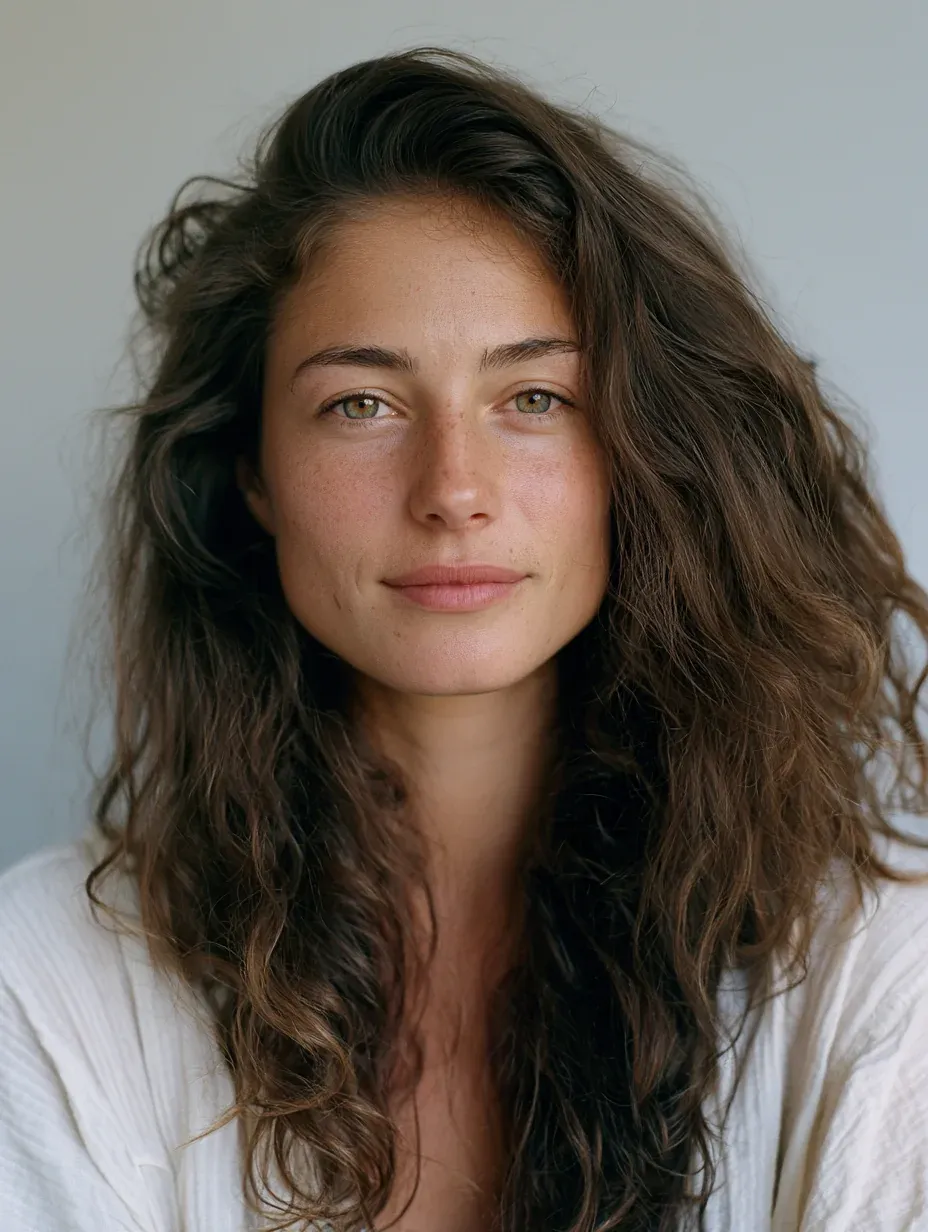
In the web app, click the image icon in the Imagine bar and drag the portrait into "Attach to prompt" (up to four images). In text, add --edit <image URL>; below, BASE_URL stands for that address. The result keeps the aspect ratio of the first image unless you set --ar.
Six scenes, one consistent character
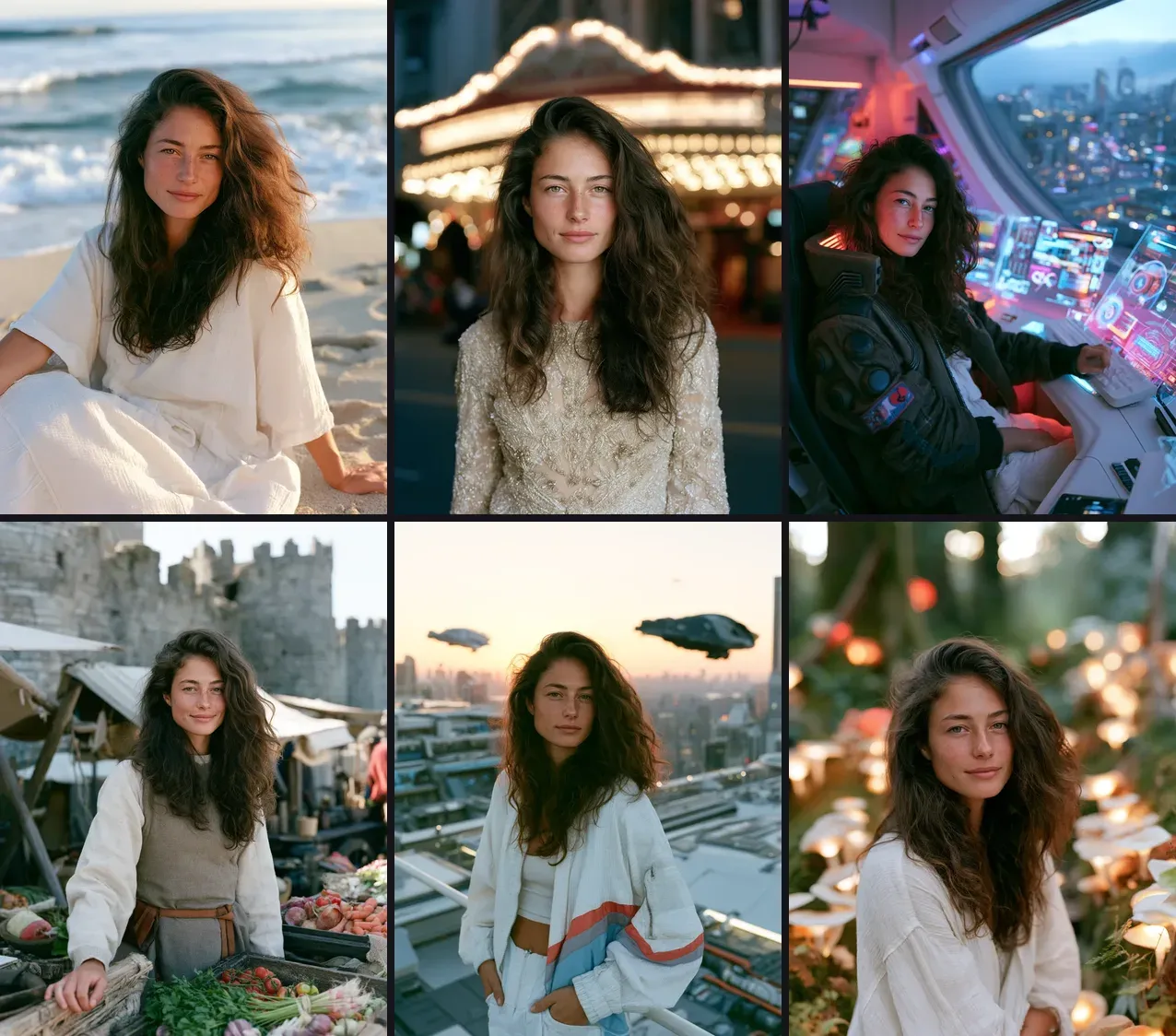
Each Edit Model prompt is an instruction that starts with "this woman" and describes only the scene. The V7 and image-prompt versions are ordinary prompts that start with "A young woman" and use the same scene text. Each row below shows three renders of the same scene: Edit Model, V7 Omni Reference, V8.2 image prompt, in that order.
1. Beach at golden hour
this woman relaxing on a sunny beach in a light summer dress, ocean waves behind her, golden hour, 35mm photo --ar 3:4 --raw --edit BASE_URL --v 8.2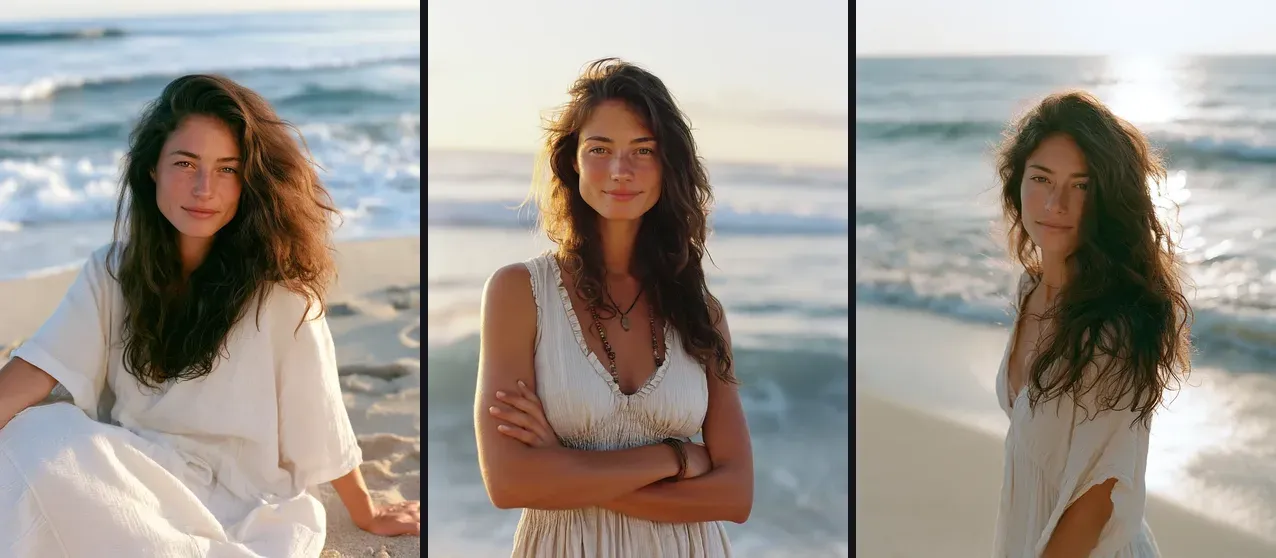
The same scene on the other two methods:
A young woman relaxing on a sunny beach in a light summer dress, ocean waves behind her, golden hour, 35mm photo --ar 3:4 --raw --oref BASE_URL --ow 100 --v 7.0

BASE_URL A young woman relaxing on a sunny beach in a light summer dress, ocean waves behind her, golden hour, 35mm photo --ar 3:4 --raw --v 8.2
Edit Model: kept. V7: kept. Image prompt: kept. Name the light and one place detail.
2. Night at the theater
this woman in an elegant evening gown standing in front of a vintage theater at night, cinematic spotlight, soft bokeh, 50mm photo --ar 3:4 --raw --edit BASE_URL --v 8.2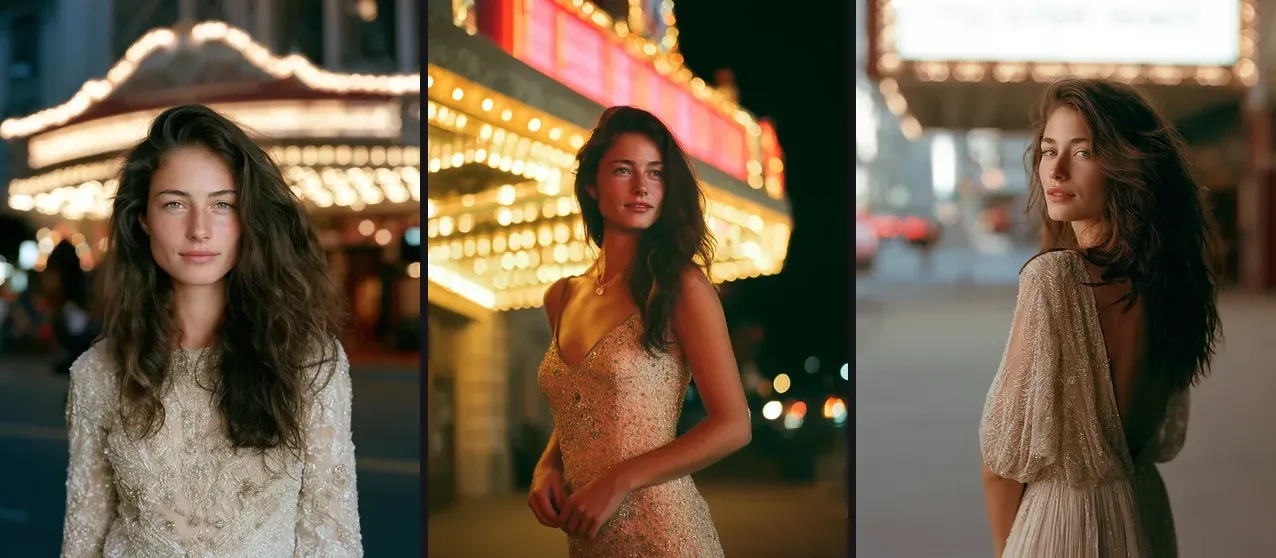
Edit Model: kept: dark street, lit marquee behind her. V7: kept. Image prompt: rejected: grey street in dusk-level light, night not established. Light words are where the weaker method slips.
3. Cyberpunk office
this woman in a futuristic office, wide angle shot, neon glow, cyberpunk jacket, holographic displays, a cityscape in the window --ar 3:4 --raw --edit BASE_URL --v 8.2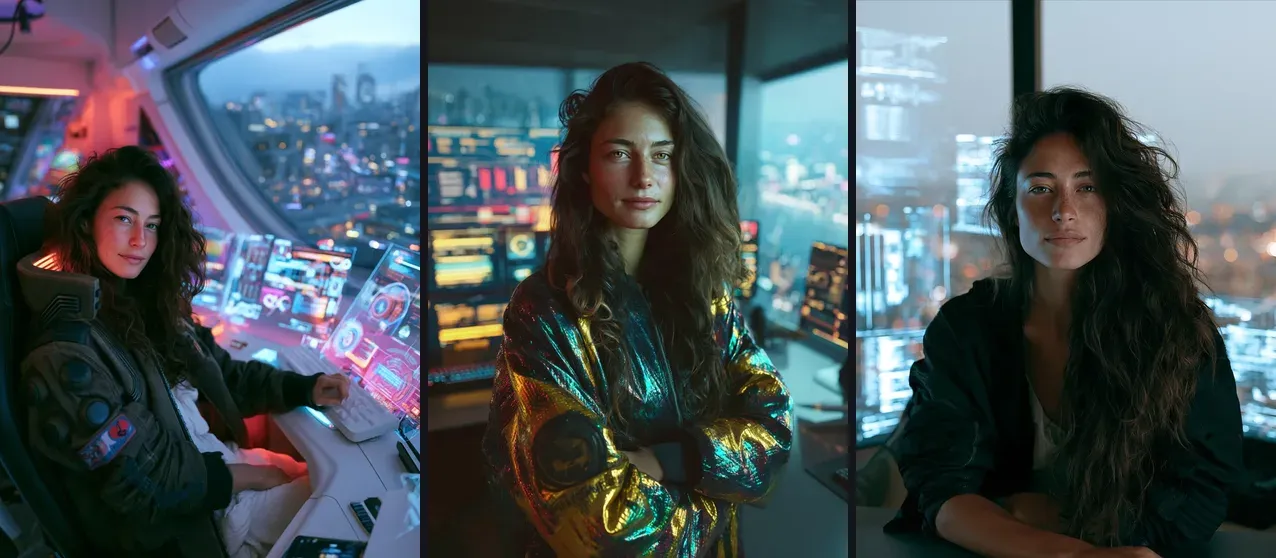
Edit Model: kept. V7: kept. Image prompt: rejected: plain dark jacket, no neon.
4. Medieval market
this woman in medieval clothes standing at a rustic market stall, old stone castle walls behind her, natural light, 35mm photo --ar 3:4 --raw --edit BASE_URL --v 8.2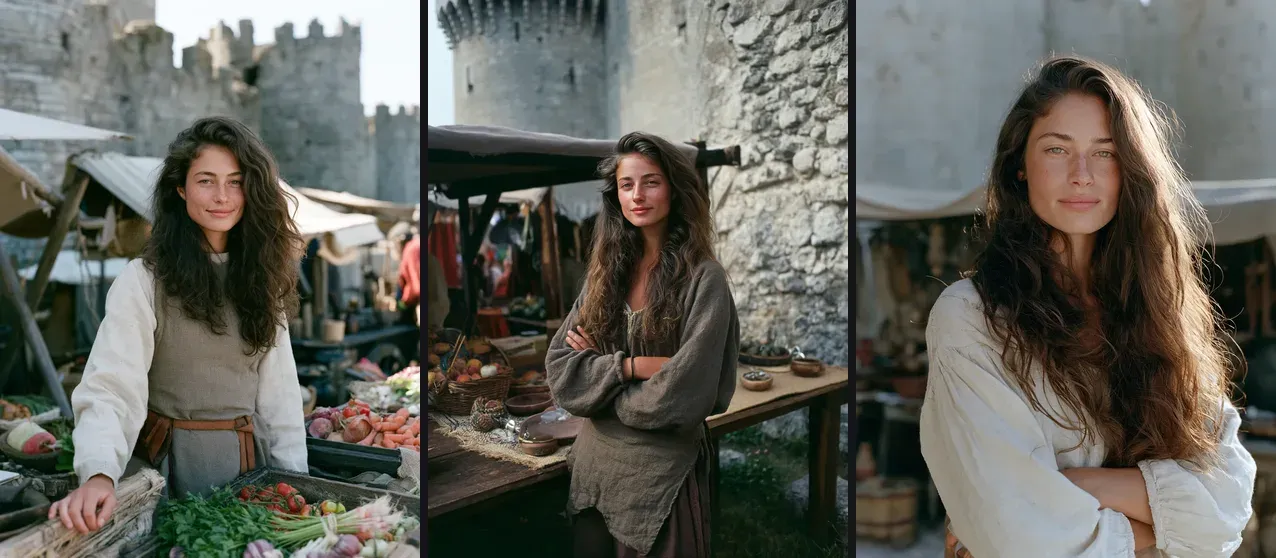
Edit Model: kept. V7: kept. Image prompt: rejected: modern white blouse, no castle walls. Name the garment once and stop.
5. Rooftop at sunset
this woman on a high-tech city rooftop at sunset, futuristic streetwear, hovering vehicles in the distance, 35mm photo --ar 3:4 --raw --edit BASE_URL --v 8.2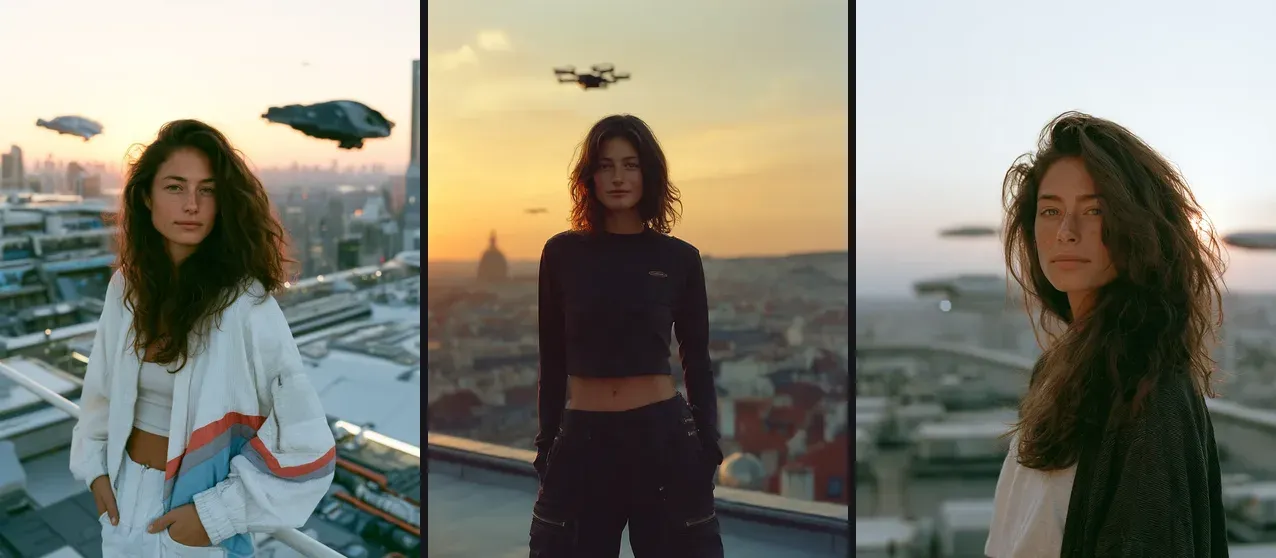
Edit Model: kept. V7: rejected: short bob, the base has long hair. Image prompt: rejected: cardigan instead of streetwear, vehicles barely visible.
6. Fantasy forest
this woman exploring a magical forest with glowing mushrooms, soft ethereal light, wide angle shot --ar 3:4 --raw --edit BASE_URL --v 8.2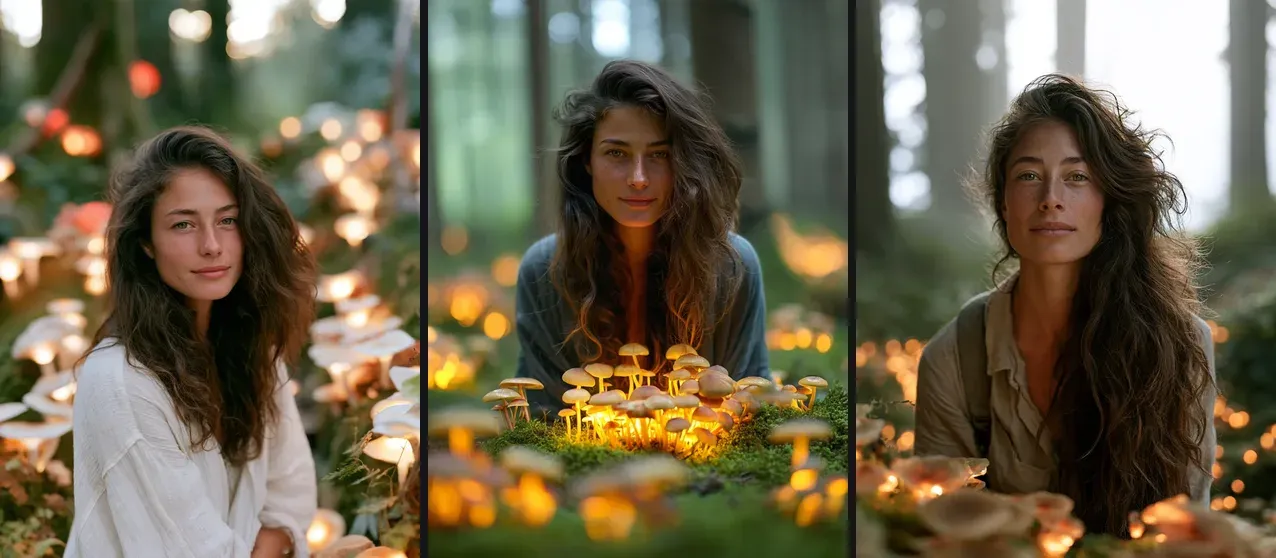
Edit Model: kept. V7: kept. Image prompt: kept. Glowing details like mushrooms carry a dreamy scene.
Results
| Scene | Edit Model | V7 Omni | Image prompt |
|---|---|---|---|
| Beach | kept | kept | kept |
| Theater | kept | kept | rejected |
| Cyberpunk | kept | kept | rejected |
| Medieval | kept | kept | rejected |
| Rooftop | kept | rejected | rejected |
| Forest | kept | kept | kept |
| Kept | 6/6 | 5/6 | 2/6 |
The full scores, with reasons, are in own-outputs-scores.csv. One base portrait, one scored render per prompt: a small test, and a re-roll can change a single cell.
Still on V7? Omni Reference
Omni Reference is a V7 feature: one reference image, --oref <image URL>, and a weight --ow from 1 to 1,000 (default 100). It uses about twice the GPU time of a normal V7 render. For V8.x the same page says to use the Edit Model instead.
A young woman on a high-tech city rooftop at sunset, futuristic streetwear, hovering vehicles in the distance, 35mm photo --ar 3:4 --raw --oref BASE_URL --ow 100 --v 7.0Weaker fallbacks
An image prompt (the URL at the start of the prompt, weight --iw, left at its default of 1 in our test) kept the face in all six scenes but followed the scene text in two. --cref is the V6 method and V8.2 rejects it; for that version, see the older cref guide.
Reuse the prompts
Swap the scene text and keep --raw --edit BASE_URL --v 8.2. Start with the instruction "this woman". For more prompt structure, see the AI art prompts hub, and to control how close or wide each scene looks, read the focal lengths and camera angles guide.

Mastering Midjourney’s CREF for Consistent Faces in Every Setting
Want to keep your AI-generated character’s face steady from beach vibes to medieval quests? Discover how Midjourney’s CREF parameter can lock in features for spot-on consistency!
The Magic of 8-Bit Pixel Graphics: Reviving Retro in Games and Comics
Pixel art is back, and it’s better than ever! Learn how to create stunning 8-bit graphics with MidJourney and bring the charm of retro gaming and comics to life.
7 Stunning Materials for Material-Based Creations in MidJourney
MidJourney makes it easy to bring material-focused designs to life, from opulent dining rooms to exotic sculptures. Whether you’re working with classic materials like wood and marble or experimenting with more unique textures like basalt and rattan, these steps will help you!